Apply looksto ProRAW photos on iPhone
The iPhone app for Apple ProRAW grading
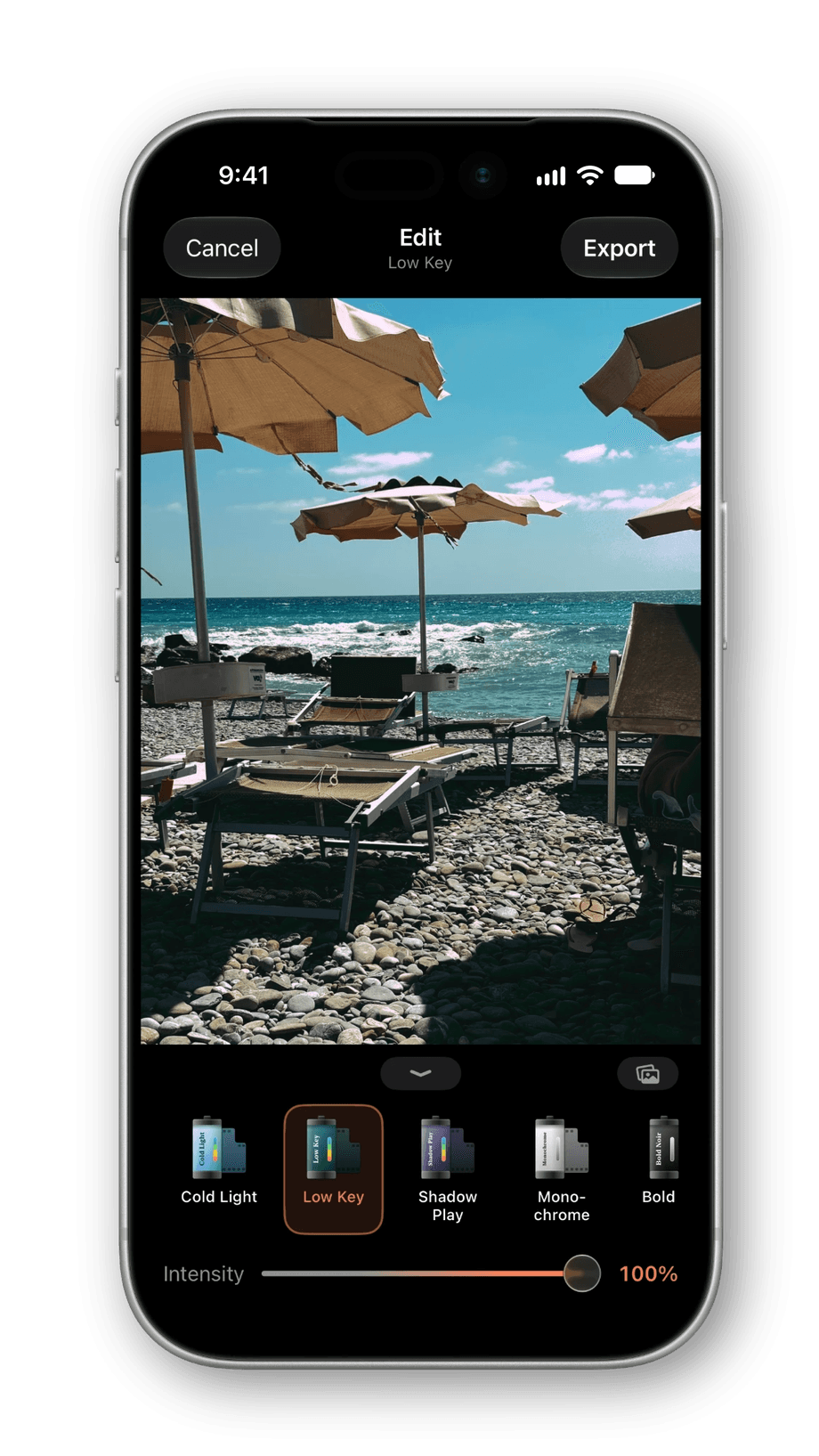
Apply a look. Export. Done.
RAWCraft does one thing and does it well. No complicated editor, no learning curve.
10 built-in looks, plus your own
Start with 10 ready-made looks, or import your own .cube LUTs and .xmp presets
One simple slider
Blend your chosen look from a subtle tint to a full cinematic grade. The only dial you'll ever touch.
Full-quality export
Export straight to your library in any of 4 formats, ready to share
From RAW to graded in three steps
No desktop, no plugins, no exporting back and forth. Everything happens on your iPhone.
 1
1Upload your photos
Pick one or more ProRAW shots from your library. Your originals are never changed.
 2
2Apply a look & set intensity
Choose a built-in look or one you imported, then use the single slider to dial it in.

Export & save
Save a HEIC, JPEG, TIFF, or AVIF in sRGB or wide-gamut Display P3, ready to share.
One price. Yours forever.
One-time purchase
$14.99
Free to try with 10 full-quality exports- No subscription
- No account
- Unlimited and batch exports
- Every future update included
Before you download.
What a look is, what happens to your originals, and how the price works.
What is a LUT / Preset?
A LUT (look-up table) - often called a preset - is a color recipe used throughout film and photography. A .cube or .xmp file remaps the colors in your photo to create a specific look.
Does RAWCraft come with any LUTs / Presets?
Yes - RAWCraft ships with 10 built-in looks so you can start editing right away. You can also import unlimited .cube and .xmp files, so your library grows into something truly yours. Any standard .cube LUT or .xmp preset works - export one from a desktop tool, buy a pack online, or create your own.
Will it change my original photo?
Never. Your original ProRAW file is always preserved. RAWCraft exports a brand-new HEIC or JPEG and leaves the RAW completely untouched.
Do I need an internet connection or an account?
No. All processing happens on-device using Apple's Metal engine. RAWCraft never uploads your photos and doesn't require an account or sign-in.
Is it a monthly subscription?
No. RAWCraft is a one-time $14.99 unlock. Pay once and own it forever, including all future updates. The free version includes 10 full-quality exports so you can try it first.
What iPhone do I need?
RAWCraft runs on iOS 17 and later. Capturing ProRAW requires a Pro iPhone (iPhone 12 Pro or newer), but you can edit any ProRAW file already in your library.
Still curious? Email hello@lewislovelock.com.
What is RAWCraft?
RAWCraft is an iPhone app that applies your own .cube LUTs and Lightroom .xmp presets to Apple ProRAW photos. It ships with 10 built-in looks and imports unlimited more, so the library is part ours and mostly yours. Each photo gets one look and one intensity slider, batches run up to 30 photos, and exports come out as HEIC, JPEG, TIFF, or AVIF in wide-gamut Display P3 or sRGB. Everything happens on the device, there is no account, and the original RAW file is never modified.
It is built for photographers who shoot ProRAW and already own their looks: a preset pack bought years ago, a LUT exported from a desktop grade, a style you have refined and want on every photo without rebuilding it slider by slider. If that is you, the whole app is two taps: the look, then how much of it. If you are still setting the phone up, start with the best iPhone camera settings for photos, and if you are weighing it against a dedicated camera, iPhone vs digital camera for photos is the honest comparison.
It is deliberately not a general editor. There is no crop, no curves, no healing, and no video, and if that is what you need, our honest rundown of the best iPhone photo editing apps will point you somewhere else without hard feelings. The plain-text version of everything on this page lives at rawcraft.app/facts.
From the guides
Plain-English how-tos for LUTs, presets, and ProRAW on iPhone.
The best LUT apps for iPhone photos in 2026
VideoLUT, LUT Studio, PeekLut, Lightroom and RAWCraft compared: which are free, which are one-time, which need a subscription, and which watermark exports.
Read guideWhat is a LUT? Look-up tables in photos and video
What LUT means in plain English: what a look-up table does to your colors, 1D versus 3D, why .cube is the standard, and video versus stills.
Read guideHow to color grade iPhone photos
How to color grade iPhone photos: pick the look by the light, not the subject, push it to the right strength, and keep a whole shoot reading as one set.
Read guideThe best iPhone camera settings for photos
The iPhone camera settings worth changing before you shoot: ProRAW, resolution, exposure, and the toggles to leave alone, so every photo can take an edit.
Read guideWhat is Apple ProRAW? And how to edit it on iPhone
What Apple ProRAW is in plain English: why the photos look flat on purpose, how to turn ProRAW on and shoot it, and how to edit and export it on the phone.
Read guideHow to apply a .cube LUT to an iPhone photo
Most LUT advice for iPhone is about video. Here is how to get a .cube file onto your phone, apply it to a photo, and export at full quality.
Read guide