An iPhone RAW photo editor has one job that ordinary photo editors do not: it has to develop the file. A RAW photo is unfinished on purpose, holding its contrast and color back so you can decide the final look, and until something develops it, there is no picture, just data. The good news is that you do not need a desktop for any of this. The phone that shot the file can develop it, grade it, and export it at full quality.
This guide covers what a RAW editor on iPhone actually has to do, the honest options, and where RAWCraft fits. If you are still working out what RAW is in the first place, start with what Apple ProRAW is and come back.
What a RAW photo editor on iPhone has to do
Plenty of apps will open a RAW file. Fewer treat it properly. Four things separate a real RAW editor from an app that quietly converts your file and edits the copy:
- It develops the RAW, not a preview of it. An Apple ProRAW is a 12-bit DNG holding far more color and dynamic range than a finished photo. The editor should work from that data, so your adjustments move real information rather than stretching a baked-in JPEG.
- It keeps the quality on the way out. Exporting to wide-gamut Display P3 keeps the color the file captured. An editor that only writes sRGB throws part of it away, which is the usual reason an export looks flatter than the preview did.
- It never touches the original. RAW editing should be non-destructive: a new file is written and the DNG stays exactly as shot, so you can re-edit from the same starting point next year.
- It works on the phone. The whole point of shooting RAW on an iPhone is losing the desktop step, not adding one.
The two jobs hiding inside "editing"
People searching for a RAW editor usually mean one of two different things, and the right app depends on which.
Correcting is fixing the photo: exposure, white balance, straightening, pulling a blown sky back. Slider work, done one photo at a time.
Grading is styling it: applying a saved look, a LUT or a preset, so the color leans the way you want and a whole shoot reads as one set. One tap and an intensity slider, and the same decision lands on every photo.
RAW files are the best material for both, because the latitude that lets you rescue a highlight is the same latitude that lets a look move the color without the image falling apart. The order matters, correct first and grade second, and how to color grade iPhone photos covers the judgement side of that.
Which iPhone RAW photo editor should you use?
The honest answer is that most people need two apps, a corrector and a grader, and both jobs have a free or cheap answer.
Apple Photos is the corrector already on your phone. It opens a ProRAW natively, its sliders genuinely work on the RAW data, and it costs nothing. What it does not have is any way to import a look: no .cube files, no .xmp presets, so consistency across a set means moving the same dozen sliders on every photo.
Lightroom Mobile is the deep option. Free to use with an Adobe account, it develops RAW properly and its tools go further than anything else on the phone: curves, masking, healing. It is the natural home of Lightroom .xmp presets. What it will not do on mobile is read a .cube LUT, and the deeper features sit behind a subscription.
Darkroom is a serious RAW corrector with filters, and it has offered a one-time unlock alongside its subscription, so check what its listing currently sells. A good pick if you want real editing tools without Adobe.
RAWCraft is the grader. It develops your ProRAW and applies looks you own, both .cube LUTs and .xmp presets from one library, with an intensity slider per photo and batches of up to 30. It is deliberately not a corrector: no exposure, no crop, no curves. One-time $14.99, everything on device, no account.
| App | Develops RAW | Corrections | Your own looks | Cost |
|---|---|---|---|---|
| Apple Photos | Yes | Yes, sliders | No | Free |
| Lightroom Mobile | Yes | Yes, the deepest | .xmp only | Free with an account, subscription for pro tools |
| Darkroom | Yes | Yes | No imports | One-time unlock or subscription, check listing |
| RAWCraft | Yes | No, deliberately | .cube and .xmp | One-time $14.99 |
If you want one app to do everything, Lightroom is the closest thing to it. If you want the pairing that stays off a subscription, Apple Photos for corrections plus RAWCraft for looks covers the whole workflow for a one-time $14.99, and the LUT app comparison goes deeper on the look-applying half.
How RAWCraft edits a RAW photo
The workflow is deliberately short, because the app only does the grading half.
- Open your ProRAW. RAWCraft reads the DNG from your library and develops it on the spot. The flat look disappears the moment a look lands on it.
- Tap a look. One of the 10 built-in looks, or any
.cubeLUT or.xmppreset you have imported. The step-by-step for getting files in is in how to apply a .cube LUT. - Set the intensity. Each photo keeps its own look and strength, so one loud photo can come down without dragging the rest of the set with it.
- Export. HEIC, JPEG, TIFF, or AVIF, in Display P3 or sRGB, at full resolution. The original file is never modified.
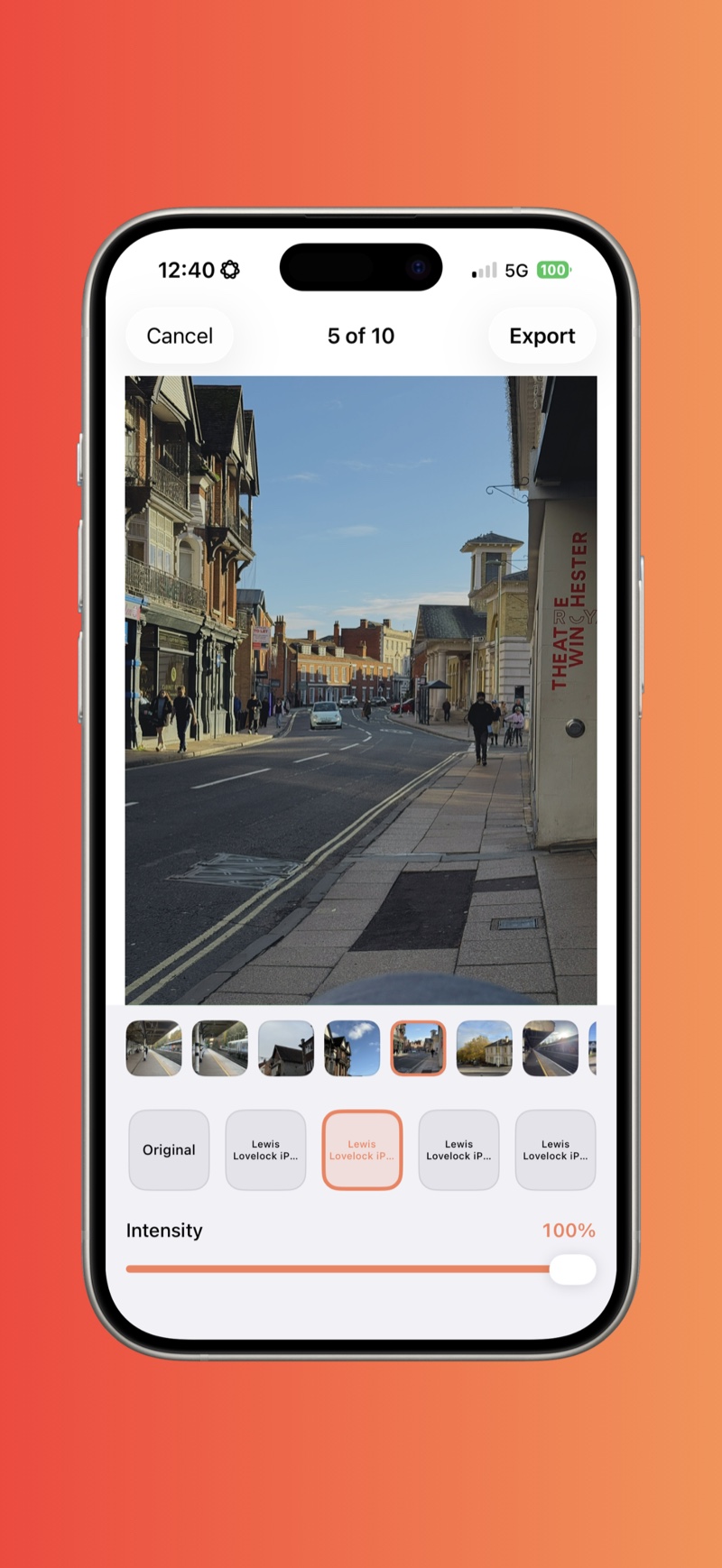
Everything runs on the device. No account, no upload, and the ten-export free tier means you can run your own files through it before paying anything.
Where it is the wrong choice: if your photos need fixing rather than styling, RAWCraft has nothing for you, and Apple Photos or Lightroom is the answer. It also does not touch video.
Do you even need a RAW editor?
Worth asking honestly. If you shoot normal HEIC photos and never plan to edit, a RAW workflow adds file size and an extra step for nothing, and the camera's own processing already does a good job. The case for RAW is control: you edit, you print, you care about a consistent look across a set, or you keep hitting scenes the automatic processing gets wrong.
If that is you, the setup side matters as much as the editor: ProRAW ships switched off, and what Apple ProRAW is covers turning it on and shooting it well.
Quick answers
Can you edit RAW photos on an iPhone without a computer? Yes, completely. Apple Photos corrects a ProRAW natively, and a look-based editor grades it and exports at full quality. A desktop adds deeper tools, not a requirement.
What app opens a DNG on iPhone? Apple Photos, Lightroom Mobile, Darkroom, and RAWCraft all open an Apple ProRAW DNG directly. DNG files from other cameras open in Lightroom and Darkroom too.
Is Apple Photos a real RAW editor? For corrections, yes. It develops the RAW and its sliders move real data. It has no way to import a LUT or preset, which is the half a look-based app covers.
Does editing a RAW photo change the original? Not in any editor worth using. A new file is exported and the DNG stays as shot. RAWCraft never writes to the original.
Do I need Lightroom to edit RAW on iPhone? No. It is the deepest option, but corrections are covered free by Apple Photos, and .cube LUTs need a different app anyway, because Lightroom Mobile does not read them.
RAWCraft is a one-time $14.99 with 10 free exports so you can try it on your own RAW photos first.